
November 2004
The LawsonGuru Letter is a free periodic newsletter containing provocative commentary about issues important to the Lawson Software community. The LawsonGuru Letter is published by-and is solely the opinion of-John Henley of Decision Analytics. Visit Decision Analytics at https://www.danalytics.com. For subscription information, see the bottom of this message.
The LawsonGuru Letter is not affiliated with Lawson Software.
In this issue:
1. First Look: Lawson Mobile Par&Cycle Count (MPC)
2. Reporting, Part 7: Categorizing Reports
3. Worthwhile Reading
4. Lawson Tips&Tricks
1. First Look: Lawson Mobile Par&Cycle Count (MPC)
| Isn't it time you replaced this slow and outdated technology?
Lawson's new Par and Cycle Counting may be the answer.
Last year, Lawson acquired Apexion Technologies, makers of software for surgical instrument and mobile supply chain management.
Since the acquisition, Lawson has taken these products--previously PeopleSoft-specific--made them Lawson-centric, and re-branded them as: |
 |
- Mobile Par & Cycle Count (MPC)
- Receiving and Delivery Tracking (RAD)
- Surgical Instrument Management (SIM)
These new products are part of Lawson's enterprise resource optimization (ERO) solutions. The goal, of course, is to help you build a strong, efficient foundation to support your mission: providing excellent patient care.
Over the next three months, we're going to take a closer look at each of these products, starting this month with Mobile Par & Cycle Count (MPC, for short).
If you've had to live with the slow, memory-starved, and often-unreliable handheld terminals, the look-and-feel of the MPC product will make you wish you had it already! MPC combines advanced Windows CE-based mobile handhelds and Web browser technologies, delivering the following key features and functionality:
Par and Cycle Counting
Par and Cycle Counting works in conjunction with Lawson's Inventory Control (IC) module. This allows your healthcare organization to more accurately and efficiently attain optimal inventory levels, improve service and decrease costs in a number of key ways.
- Downloads to the handheld a complete list of par areas that need counting
- Gives users the flexibility to create individual short lists of par areas to manage
- Allows users to scan barcodes or enter item numbers, in any order
- Supports blind and non-blind cycle counting at the warehouse level
- Data may be transmitted immediately (in a fully wireless environment) or when the user returns to a wireless area (in a partially wireless setting), or when the handheld is cradled (in a non-wireless environment)
 Item Barcode and Location Label Printing
- Easy printing of complete sets or individual item labels, as well as location labels for placement at or near each par area
 Picking
- Enables wireless picking in stockrooms
- Allows simultaneous counting and picking activities
Activity Tracking and Reporting
- Tracks user activities, including actions performed and task durations
- Provides supervisor access to reports identifying which areas were counted by each user, how many bins were counted and when the activity occurred
- Search for a specific user or date / time range
- Identify items/hour, number of forms counted, and time between counts
- Data can be exported to Excel
 Mobile Technology Platform
- Uses the Microsoft Windows CE/Pocket PC operating system
- Symbol 8846 - Pocket PC
- Dolphin 7400 - Windows CE
- Wireless (802.11b) technology, supporting 128-bit encryption
- Supports multiple transmission modes, including real-time wireless, intermittent wireless and cradle-based synching
- Handhelds can be used for any Windows-CE application-they aren't dedicated to Lawson
- Lawson 8.0.3 Environment
- Lawson 8.0.3 Applications
The Bottom Line
This product may be the toughest one for Lawson to sell. Sure, it's slick and much more productive than the old handheld terminals (HHT) it aims to replace. The loudest objections I've heard, though, are that healthcare organizations have too much invested in HHT to replace them.
But, I say that the HHTs are out-dated, likely are fully-depreciated, and it's time to re-invest. Look at the other technologies you have around you. Are you still using CRT monitors, or have you upgraded to LCDs? Are you still using line printers, or have you switched to laser? Likewise, maybe it's time to move from HHT to MPC.
Once you see it, I'll bet you'll agree.
2. Reporting, Part 7: Categorizing Reports
In this month's installment of our on-going reporting series, let's turn our attention from looking at individual reporting products solutions, and instead look at your report development project. If you're like most organizations I come across, your reporting project charter is to replace an existing reporting system-be it a formal existing system, or a simply a list of user requirements if you had no previous formal system. Regardless, you need to develop and use a process that focuses on satisfying the report requirements when implementing a new reporting solution.
Remember the "Big Picture"
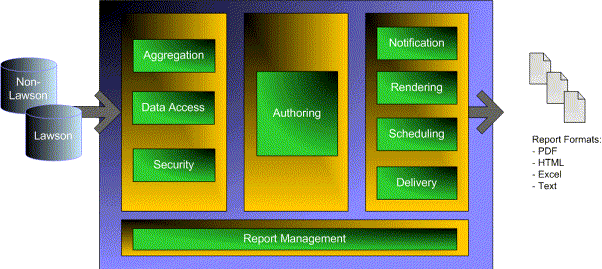
Looking back a few months (see https://www.danalytics.com/guru/letter/archive/2004-05.htm), remember the characteristics that I laid out for a comprehensive reporting solution. As you develop the report design process, keep in mind that the process itself needs to encompass a lot of these areas:
Develop a Reporting Matrix
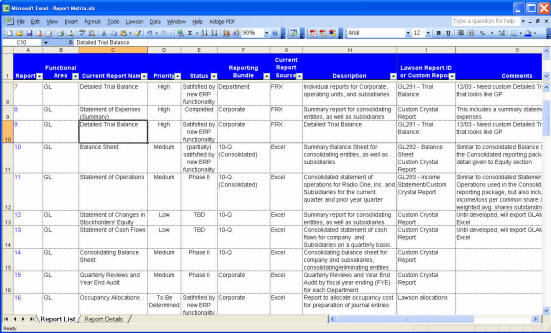
Just like any project, implementing a reporting system requires some planning. Part of your project should include the formulation of a reporting matrix. In addition to serving as project roadmap, you can use the matrix to track report development and requirement fulfillment. That way, you can easily see how far along you are in your project plan. The matrix needs to capture the requirements and details about each report, such as:
- Report Name
- Report Purpose
- Report Owner/Function
- Current Report Source
- Distribution Requirements
- Retention Details
- Implementation Details
When you're done, your matrix will look something like this:
Categorizing your Reports
Here are some things to think about when categorizing reports:
- What is the overall purpose of the report?
- Who is the audience?
- Most reports can be categorized as analysis (usually viewed on-line) vs. transactional (usually printed and viewed off-line)
- What is the frequency of the report? Is it something that can or should be scheduled daily/weekly/monthly? Is it ad-hoc?
- Think function over form. At the design point, you don't need to be concerned with fonts and formatting.
- Don't re-invent the wheel. Sometimes, an existing Lawson report may be just what you need, and may have most, if not all, of the desired information (regardless of format). There are indeed some pretty good Lawson reports; in particular, I like AC410 for activity balances. If a Lawson report is "good enough", it's probably sufficient, since you can look at the report as a PDF from Portal, and (sometimes) bring it up as a CSV in Excel without losing any context/data. In some cases, you can also use a Lawson report as a data source in a Crystal report (see https://www.danalytics.com/guru/letter/archive/2004-10.htm)
- Look at the security requirements of your reports. Security is the toughest obstacle in reporting. How much security is enough? Can users see transactions across Accounting Units? Can they drill back into Payroll, and if so, how far?
- Look for similarities across reports...do you really have requirements for 50 different reports, or is it really just 5 different reports, with 10 different selection criteria?
+++++++++++++++++++++++++++++++++++++++++++++++++++++++++++++++
- QUOTE OF THE ISSUE -
"On account of being a democracy and run by the people, we are the only nation in the world that has to keep a government four years, no matter what it does."
- Will Rogers
+++++++++++++++++++++++++++++++++++++++++++++++++++++++++++++++
3. Worthwhile Reading
How to Build an Agile IT Department
You can't be a little bit agile. You can't be agile in one area and not in another. You need agility in staffing, architecture, budgeting, governance, vendor relations and programming. And if that sounds like a lot, well, it is. But it's worth it.
CIO Magazine, August 15, 2004
http://www.cio.com/archive/081504/builit.html
Taming runaway spreadmarts
Runaway spreadsheets and desktop databases wreak havoc on organizations and it's a problem that's largely ignored.
Application Development Trends, October 2004
http://www.adtmag.com/article.asp?id=10057
The Power of Two
Mellon Financial is implementing an IT-business team approach to manage its most complicated projects.
CIO Magazine, September 15, 2004
http://www.cio.com/archive/091504/mellon.html
The five missing pieces of SOA
Maturing Web services standards make an SOA seem practical. But should you start now or wait until they fill in the gaps?
InfoWorld, September 13, 2004
http://www.infoworld.com/article/04/09/10/37FEwebservmiddle_1.html
4. Lawson Tips & Tricks
Share your tips. Send them to
mailto:letter-tips@lawsonguru.com.
(This month's tip comes from E.J. Hikel at Eastern Maine Healthcare.)
Uploading to Asset Management using Lawson's Excel Add-In
We've found some limitations using the Excel Add-In's Upload Wizard in Asset Management because Additions, Adjustment, Transfers and Disposals often prompt new forms after the first record is entered onto the first form.
Our way around this is to not use the standard entry forms, but some alternate forms.
For additions, use AM15.1 instead of AM20.1 or AM20.2. You'll be required to enter Vendor and Invoice information, but usually this is available or you can use something generic. Once you have added your assets, run AM115 to interface them to AM20 screens.
For disposals, use AM45.1 instead of AM40.1. This is the mass disposal screen, so you will need to define a Selection ID, you company, Function Code field (=A for each record) and Asset Number. I was surprised but very delighted to find that this worked when we recent disposed thousands of assets (that couldn't easily be grouped on AM45 using the conventional method. Once the assets have been added to the Selection ID, run AM145 to process the mass disposal. I haven't tested, but this should work for transfers as well (AM35).
The LawsonGuru Letter is a free periodic newsletter providing provocative commentary on issues important to the Lawson Software community. The LawsonGuru Letter is published by--and is solely the opinion of--John Henley of Decision Analytics. Visit Decision Analytics at
https://www.danalytics.com.
To subscribe, visit https://www.danalytics.com/guru/letter/
Copyright © 2004, Decision Analytics. All rights reserved. Please share The LawsonGuru Letter in whole or in part as long as copyright and attribution are always included.
Decision Analytics is an independent consultancy, focusing on Lawson technical projects, and specializing in customization/modification, data conversion, and integration/interfaces. Please visit
https://www.danalytics.com for more information.
Decision Analytics. Integrating Lawson with the Real World.