
December 2005
The LawsonGuru Letter is a free periodic newsletter containing provocative commentary about issues important to the Lawson Software community. The LawsonGuru Letter is published by-and is solely the opinion of-John Henley of Decision Analytics. Visit Decision Analytics at https://www.danalytics.com. For subscription information, see the bottom of this message.
The LawsonGuru Letter is not affiliated with Lawson Software.
In this issue:
1. Guest Spot: Create Lawson PDFs from PERL
2. Does Landmark Change Lawson’s Offshore Strategy?
3. Upload to HR11 User Fields with Excel Add-In
4. Worthwhile Reading
5. Lawson Tips & Tricks
1. Guest Spot: Create Lawson PDFs from PERL
(by Aleksei Wolff)
Recently I received a request from a high level Manager that at first thought seemed impossible. But seeing that I had just taken a PERL scripting class I decided to tackle the request hoping that PERL might provide an easy solution. The request is paraphrased below:
“Tax season is coming up and we need to do our yearly run of Asset Management jobs to send to the tax folks. The tax folks do not have access to Lawson so we need to provide the reports to them as PDF files. By the way I calculated the number of jobs we need to run and it amounts to about 4000, so manually going into Lawson Portal’s Print Files screen to save each report as a PDF is not an option. Oh yeah I almost forgot I need this done by the end of this week”
Day 1:
With my task clearly defined I set out to solve it. Examining the Print Files screen I noticed that Lawson provided an option to view print files either as text or in PDF format. That explained the statement provided by the Manager “so manually going into Lawson Portal’s Print Files screen to save each report as a PDF is not an option...”.
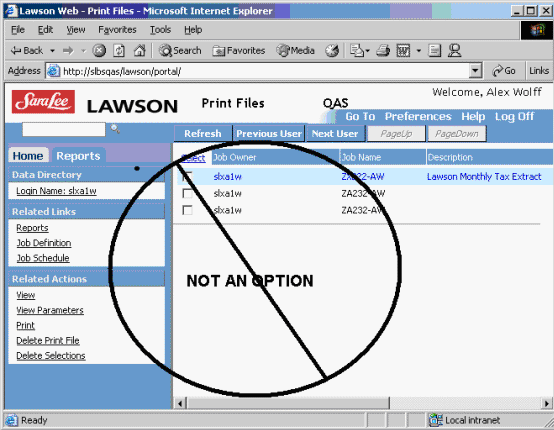
Figure 1. Manually viewing the print file and saving it as PDF is not an option.
My job got a lot easier when I realized Lawson already provided the functionality I was looking for. All I had to do was figure out how it was doing it and make it work for my purposes. It eliminated having to purchase a 3rd party product which would save the company a whopping $100-$150.
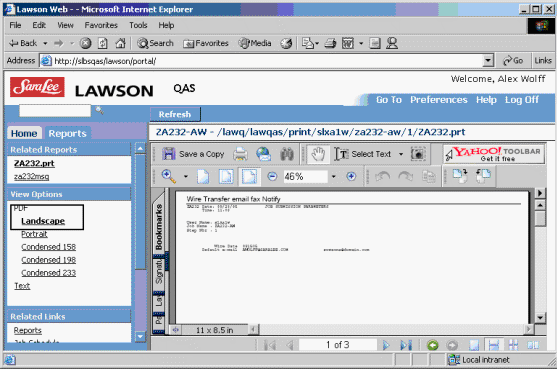
Figure 2. Lawson provides a mechanism for viewing PRT files as PDF.
Day 2:
Sometime mid-morning I ran over to the local web administrator and asked. “I am hoping you can tell me what the what the web-server is logging as a call every time I go and view some Lawson print files as PDF files?”.
After a few minutes of grep’ing at log files and me going back and forth to mimic the actions via my web browser the web administrator was able to provide several log file lines which showed that every time I view the print files as PDF Lawson would make a call to a cgi-program called WEBRPT.EXE:
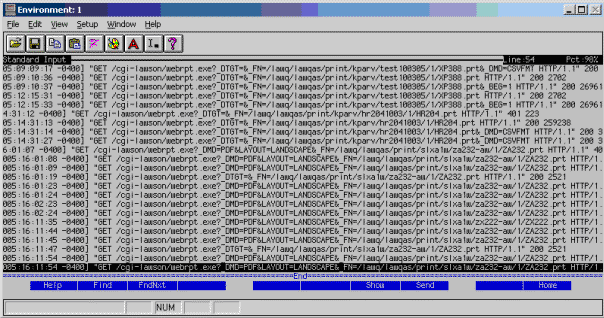
Figure 3. Access logs showing calls to webrpt.exe on Unix/SunOne server.
Day 3:
So now I was really on to something. I had the exact command that Lawson was using to convert print files to PDF. I just had to do a little more digging into how to use the command. At this point I figured that I could possibly write a PERL script that would make the same call to this WEBRPT.EXE program that Lawson was using and take the converted PDF file and save it someplace on the server. I was not sure if this was possible, but seemed a reasonable path to continue pursuing.
After looking at the various calls, I deciphered a general format for the WEBRPT.EXE call:
URL: http://<server-name>/cgi-lawson/webrpt.exe?
PARAMETERS:_DMD=PDF&LAYOUT=LANDSCAPE&_FN=<full-path-to-print-file>
One drawback is that the full path to the print file must be a valid record in the USERRPT GEN file.
Day 4:
I got down to business on the PERL side of things. I had to come up with a script that could make an HTTP call to the web-server and using WEBRPT.EXE pass it all the parameters required. I had already automated the portion that would execute each Asset Management job via a 4GL/Lawson batch program. At the completion of each Asset Management job I would kick off the PERL script pass it all the parameters and let it do its thing. I also wanted to create the script so it could be invoked at the command line to be used on a one-by-one basis. Feel free to enhance this script or make it more user-friendly. Use this script on at your own risk there is no guarantee that it will work at your specific locale (i.e. OS, PERL version, Lawson Environment, etc.). Enjoy.
#!/opt/perl/bin/perl
# THIS SOFTWARE IS PROVIDED ``AS IS'' AND WITHOUT ANY EXPRESS
# OR IMPLIED WARRANTIES, INCLUDING, WITHOUT LIMITATION, THE
# IMPLIED WARRANTIES OF MERCHANTABILITY AND FITNESS FOR A
# PARTICULAR PURPOSE.
#
# Use of this software in any way or in any form, source or binary,
# is not allowed in any country which prohibits disclaimers of any
# implied warranties of merchantability or fitness for a particular
# purpose or any disclaimers of a similar nature.
#
# IN NO EVENT SHALL I BE LIABLE TO ANY PARTY FOR DIRECT, INDIRECT,
# SPECIAL, INCIDENTAL, OR CONSEQUENTIAL DAMAGES ARISING OUT OF THE
# USE OF THIS SOFTWARE AND ITS DOCUMENTATION (INCLUDING, BUT NOT
# LIMITED TO, LOST PROFITS) EVEN IF I HAVE BEEN ADVISED OF THE
# POSSIBILITY OF SUCH DAMAGE
#
# Copyright September 2005, Aleksei S. Wolff
#
# This software may be freely copied, changed or redistributed under
# the same terms and conditions as Perl itself as long this disclaimer and copy
# right statement stays intact.
## Import Packages
use LWP::UserAgent;
use strict;
use warnings;
## Check all arguments have been provided
if (scalar(@ARGV) < 7) {
print 'Usage: prt2pdf.pl pl user step jobname prtfile path+dest rlog'."\n";
print ' pl - product line (i.e qas, prod) '."\n";
print ' user - username of printfile '."\n";
print ' step - job step '."\n";
print ' jobname - lawson user job name (lowercase) '."\n";
print ' prtfile - print file name (i.e. AM190.prt) '."\n";
print ' path+dest - full path and file name of PDF '."\n";
print ' rlog - full path to *.rlog '."\n";
exit 12;
}
## Parse Arguments
my $pl = $ARGV[0];
my $user = $ARGV[1];
my $step = $ARGV[2];
my $jobname = $ARGV[3];
my $prtfile = $ARGV[4];
my $dest = $ARGV[5];
my $rlog = '>> '.$ARGV[6];
my $curtime = localtime(time);
my $server = '';
my $file = '';
## Open RLOG
open(RLOG, $rlog) or die "Error opening RLOG for Append\n";
print RLOG "Starting script $0 at $curtime\n";
##Client Specific determination of productline/server
if ($pl =~ m/qas|integ/) {
$server = 'slbsqas';
$file = '/lawq/lawqas/print/'.$user.'/'.$jobname.'/'.$step.'/'.$prtfile;
}
elsif ($pl =~ m/prod/) {
$server = 'slbsprod';
$file = '/lawp/lawprod/print/'.$user.'/'.$jobname.'/'.$step.'/'.$prtfile;
}
elsif ($pl =~ m/dev|test/) {
$server = 'slbstest';
$file = '/law/lawson/print/'.$user.'/'.$jobname.'/'.$step.'/'.$prtfile;
}
else {
print RLOG "A valid productline was not supplied\n";
close(RLOG);
exit 10;
}
## Check status of printfile
if (( -e $file) && ( -r $file)) {
print RLOG "\n file $file exist and is available for read\n";
}
else {
print RLOG "\n there was a problem with accessing $file\n";
}
print RLOG "Server ======> $server\n";
print RLOG "File Path ===> $file\n";
##Initialize HTTP Object/Web Call...Make sure to provide correct webuser/passwd from RD30
my $webrpturl = "http://<username>:<passwd>\$\@$server/cgi-lawson/webrpt.exe?";
my $browser = LWP::UserAgent->new;
my $param = join "",'_DMD=PDF', '&_DTGT=', '&_FN=', $file;
my $fullurl = $webrpturl . $param;
print RLOG "Request URL => $fullurl\n";
my $request = HTTP::Request->new( GET => $fullurl );
my $response = $browser->request($request);
my $content = $response->content."\n";
##Save binary response to file
open FILE, '> '.$dest or die "Can't create file...hmmm\n";
binmode FILE;
if ($response->is_success) {
print FILE $content;
print RLOG "\n
File downloaded and saved!!!\n";
}
else {
print RLOG "No response from the site!!!\n";
print RLOG "\n
Check the file..Something went wrong!!\n";
}
close FILE;
$curtime = localtime(time);
print RLOG "Script $0 completed at $curtime\.\.\.\.exiting\n";
close RLOG;
exit 0;
2. Does Landmark Change Lawson’s Offshore Strategy?
Is Lawson about to reinvent itself? Remember a couple of years ago, how everyone was trying to be part of the offshore phenomenon? Lawson, not wanting to miss the party nor the potential savings, hooked up with offshore services provider Xansa. [Read More...]
3. Upload to HR11 User Fields with Excel Add-In
“You can’t do that.”
Few things bug me more than hearing that. One of the things I keep hearing about the Lawson Excel Add-In is that you can’t use it to upload to the user fields tab on the HR11 Employee form--particularly to update user fields that are not displayed on the first page (i.e. you have to PageDown to get to them).
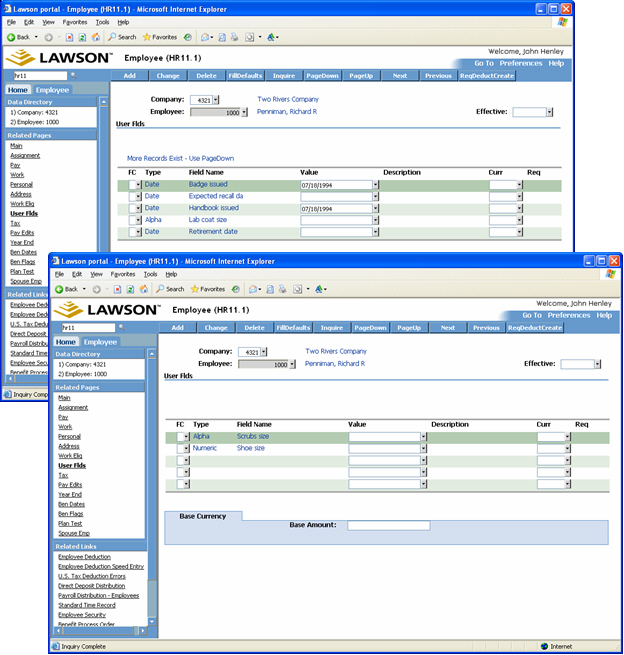
If you ask Lawson, the standard answer is “can’t be done.” So, I decided it was time to give it a try. My reasoning was that if Portal does it, then the Excel Add-In has to be able to do it as well, since they both use the same technology behind the scenes.
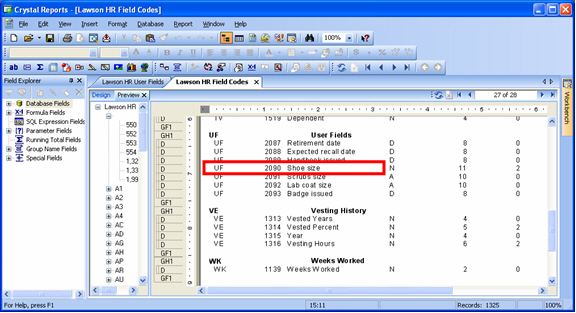
First, you need to figure out which fields on HR11 to map to, and what values to use. You have to dig a bit deeper and map to some of the hidden fields. In particular, you need to know the internal field number that Lawson has assigned to a particular user field, which is stored in PADICT. I use a Crystal Report that shows the values from some sample Lawson data:
A Quick Dive into the XML
You then need to do a little investigation into the HR11 form—peering thru Portal’s eyes. In other words, press Ctrl-Alt-A on the HR11 form in Lawson Portal, and look at the Form XML and Transaction XML:
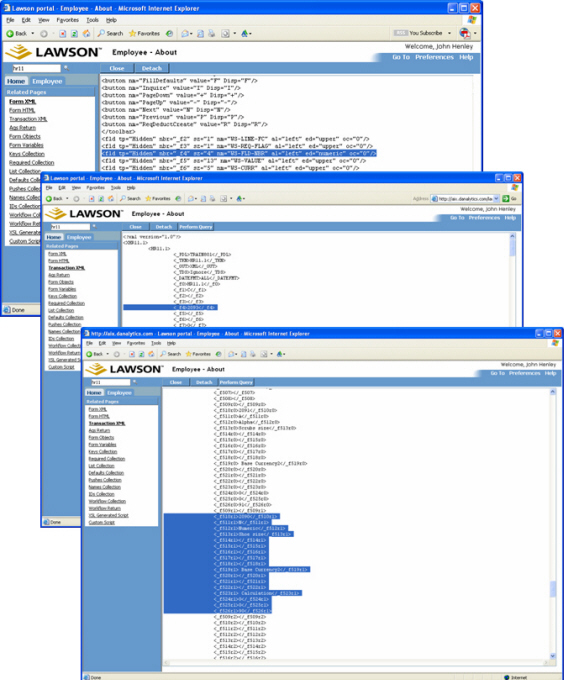
Based on this (as well as some perusal of the HR11 COBOL code, I must confess), I figured out that if I put a field number (2090 in this example) into both the WS-FLD-NBR and HRU-FLD-NBR1 fields, that Lawson would properly update that user field – “Shoe Size” in this example. What I determined from looking at the COBOL code is that Lawson stores an array of user field information (which includes WS-FLD-NBR) in hidden values in the form. This information is passed back and forth from the browser to the COBOL program so that Lawson knows which “page” of user fields are loaded on the form. I reasoned that if I stuffed the field number I wanted to update into the first occurrence in this internal array, I could “trick” the back-end COBOL form into internally positioning to that user field.
Completing the Mapping
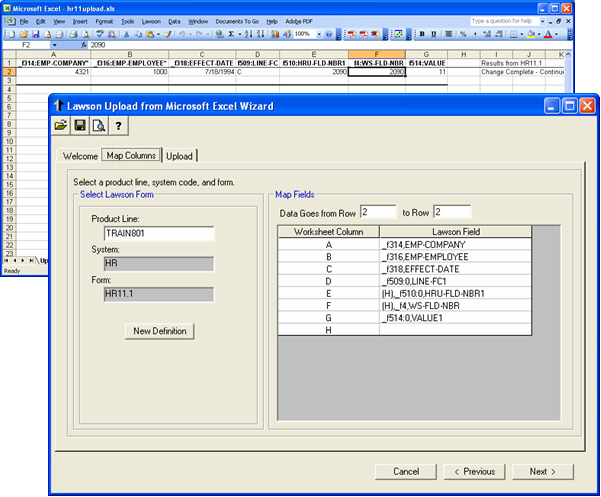
It’s also important to understand which Line Function Code (LINE-FC1) needs to be used when updating this header/detail form. In other words, you need to know whether to put an A (Add) or a C (Change) in the LINE-FC1—that of course depends on your own data and whether or not a given user field exists or not for a given employee.
One more piece of advice, which I recommend regardless of which Lawson header/detail form you are uploading to—always think in terms of uploading to line one of the form, so in this case the mapping is to LINE-FC1, HR-FLD-NBR1, and VALUE1:
Verifying the Results
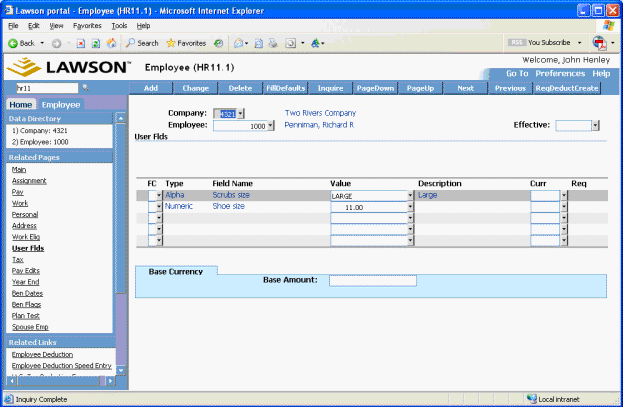
After doing some test uploads, I could go back into the HR11 form in Portal and see that the fields had indeed been updated:
An Easier Approach, Perhaps?
So while it's certainly achievable, it may not be practical. For that reason, when my clients come across a need to upload to the user fields, I supply them with a simple/flat HR employee user field update form that I wrote. The form accepts a company, employee, and user field name/value:
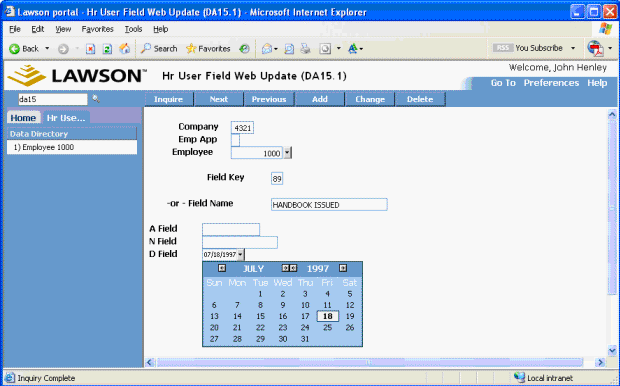
This form has standard Lawson functionality (add, change, delete, etc.), and updates the user fields using Lawson's standard library calls. My clients can then use the upload wizard to map to this form, which is far less tedious than mapping to HR11. And, using the "add, then change" function in the upload wizard, they don't have to worry about which ones are being added and which ones are being changed.
While my testing was certainly not exhaustive, I can say that yes, you can upload to HR11 user fields, even when they are not on the first page. Of course, I’d recommend doing some further testing before you jump into it with reckless abandon. And if you want to make your life a bit easier, you'll probably want to take a look at the custom form approach.
+++++++++++++++++++++++++++++++++++++++++++++++++++++++++++++++
- QUOTE OF THE ISSUE –
“There is only one valid definition of business purpose: to create a customer.”
-- Peter Drucker, 1909-2005
+++++++++++++++++++++++++++++++++++++++++++++++++++++++++++++++
4. Worthwhile Reading
.Net, Web Services, and the End of the Vendor Era
When Microsoft announced .Net, Bill Gates called it a “bet the company thing.” But in the process of becoming far less than Microsoft had dreamed, .Net has become much more than CIOs had hoped for and is pointing the way to a new definition of the CIO role, creating a world in which vendors—including Microsoft—matter less and less.
CIO Magazine, November 1, 2005
http://www.cio.com/archive/110105/web_services.html
The Right Dose of Technology Helps the Medicine Go Down
Computerized physician order-entry systems are like other tricky enterprise-wide implementations. They require a tremendous amount of tinkering and monitoring to get right.
CIO Magazine, November 1, 2005
http://www.cio.com/archive/110105/health_care.html
Business Makes The Rules
Vendors promise to put business staff in charge of rules, but do you really want users messing with mission-critical apps? Here's how four firms are balancing responsibilities for rules.
Intelligent Enterprise, November 1, 2005
http://www.intelligententerprise.com/showArticle.jhtml?articleID=172302190
RFID moves beyond the warehouse
Tagging technology opens new horizons for asset management and control.
Infoworld, October 27, 2005
http://www.infoworld.com/article/05/10/27/44FErfid_1.html
5. Lawson Tips & Tricks
Share your tips. Send them to mailto:letter-tips@lawsonguru.com.
More Troubleshooting Options for IOS
You probably know that if you need to troubleshoot the behavior of a particular Logan/IOS CGI program, you can try turning on logging for that program by creating a "touch" file on the Lawson web server for a particular CGI program. For example, to log messages related to the dme CGI program, create an empty file called dme.log.
Now, you can also create "touch" files for even more Lawson IOS programs, including the IOS servlets. These are spelled out in detail in Lawson Knowledge Base Article 127254 (see http://kmcollections.lawson.com/KMDOCS/GSC/INFOPATH/WE_2872_IOS_LOGS.HTM).
Remember: after you've finished troubleshooting, be sure to delete the .log file.
The LawsonGuru Letter is a free periodic newsletter providing provocative commentary on issues important to the Lawson Software community. The LawsonGuru Letter is published by--and is solely the opinion of--John Henley of Decision Analytics. Visit Decision Analytics at https://www.danalytics.com.
To subscribe, visit https://www.danalytics.com/guru/letter/
The LawsonGuru Letter is a free periodic newsletter containing provocative commentary about issues important to the Lawson Software community. The LawsonGuru Letter is published by--and is solely the opinion of--John Henley of Decision Analytics. Visit Decision Analytics at https://www.danalytics.com.To subscribe, send an email to: mailto:letter-subscribe@lawsonguru.com To be removed from the subscription list, send to: mailto:letter-unsubscribe@lawsonguru.com
© Copyright 2003, Decision Analytics. All rights reserved. Please share The LawsonGuru Letter in whole or in part as long as copyright and attribution are always included.
Decision Analytics is an independent consultancy, focusing on Lawson technical projects, and specializing in customization/modification, data conversion, and integration/interfaces (including BCI/Mercator). Please visit https://www.danalytics.com for more information.
Decision Analytics. Integrating Lawson with the Real World.