| |
| |
 |
|
| |
|
|
 |
April 2006
|
 |
| |
|
|
|
| |
In this issue:
1. Guest Spot: A ProcessFlow Case Study
2. Sliding Doors
3. Worthwhile Reading
4. Lawson Tips & Tricks
The LawsonGuru Letter is a free periodic newsletter providing provocative commentary on issues important to the Lawson Software community. The LawsonGuru Letter is published by—and is solely the opinion of—John Henley of Decision Analytics.
Visit Decision Analytics at https://www.danalytics.com. For subscription information, see the bottom of this message. The LawsonGuru Letter is not affiliated with Lawson Software.
This month I turn the Guest Spot over to David Williams from Paradigm ERP. Once again David shares his knowledge and some great "real-life" experiences with Lawson ProcessFlow, Ready to share your story? Drop me a line at letter-editor@lawsonguru.com.
|
|
|
| |
|
|
|
| |
1. Guest Spot: A ProcessFlow Case Study |
|
|
| |
(by David Williams, Paradigm ERP)
|
|
|
| |
|
|
|
| |
Recently, Cobb Energy Management Corporation reviewed their options for requisition approval. Tom Denison, Associate Vice President Supply, was impressed with the new feature(s) available in Lawson 8.1 and elected to approve requisitions by line. This presented some interesting challenges – the first of which was how was this to be done?
Requesting Location and Requestor setup screens give the user requisition approval options. New to Lawson 8.1 was the option to approve requisitions by line:
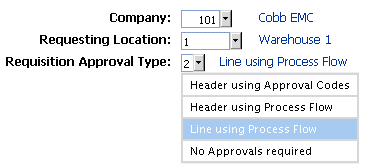
RQ04.1 Requesters
With line-level approvals, there is also a new Service Definition for ProcessFlow:
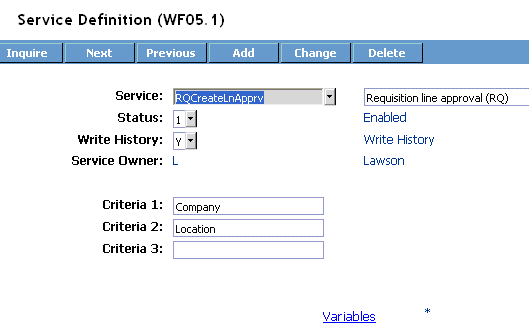
This Service creates an initial Work Unit when the requisition is released and is linked to a flow file which, in turn, creates Work Units for each line of the requisition by using a Work Object to push the requisition lines to their respective Service.
Lawson provides two different line-level Services based upon whether or not Grant Management is being utilized. These services have different Criteria and Variables associated to them. The non-Grant Management Service, ReqLineApproval, happens to be used by most companies.
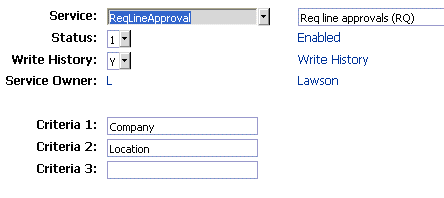
Each requisition line at this point will be associated to its own Work Unit in the Approver’s Inbasket.
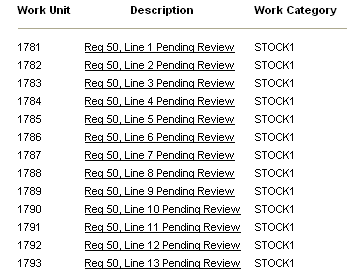
Since that means that each line goes to a UserAction node the Approver would receive an email notification for every line. Being a conscientious consultant, I didn’t like the idea of telling the client that they would receive individual email notifications for each line and then be required to work each line individually by Work Unit.
So the next challenge was coming up with a solution that would utilize the functionality of ProcessFlow but not overwhelm the Approver with emails and require the approver to point and click his mouse 4 times for every line (select the Work Unit, click the Action, confirm the Action, acknowledge the Action).
The first problem was the easier of the two to resolve. We used two UserAction nodes, one with Notify checked on and other with Notify not checked:
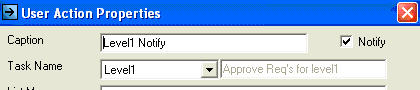
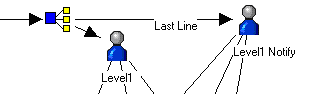
If the Work Unit was associated with the last line of the requisition (determined with a Query) the flow would Branch to the “Notify” UserAction node, otherwise it would go to the “Don’t Notify” UserAction node. This way the Approver only received one email notice:
We then toyed with different approval options – Approve Line, Approve All, Unrelease Line, Unrelease All, Reject Line, Reject All – but finally settled upon a more realistic approach. Approvers would have the option to Unrelease or Reject individual lines and then to Approve All remaining lines:
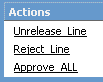
The Unrelease Line and Reject Line actions were straightforward AGS calls to RQ13.2. Once these actions were performed the Work Units would close, the Metrics would be logged and all would be well. What I needed was a way to Approve All of the remaining lines, close their associated Work Units and log their Metrics.
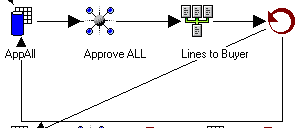
Using a Query, we find all of the open lines on the requisition (Status =1) and then send an AGS call to Approve each line to RQ13.2:
Having approved the requisition lines we now needed to close the Work Units and update the Metrics (Cobb uses this information in a Crystal Report to check the requisition’s approval status).
After using a Query to find all of the “In Process” Work Units the flow then sent an AGS call to WF20 to update the status to 4 – Completed. It then found the Metrics for the Work Unit processed, assigned the current date in AGS format to a variable, found the other associated Work Units without Metrics and updated the Metrics with an AGS call to WF25.2:
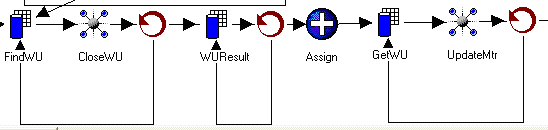
Since these steps can take a minute to process (depending on the number of Work Units associated to the requisition) the Inbasket pending tasks may not update quickly enough to clear out of the display screen and will need to be refreshed to reflect the completed status.
Approval Levels
Cobb EMC allows up to four requisition approval levels depending on the department for which the requisition is created. Each of these departments also has a different paradigm for their approval values. For example, one department may have three approval levels ($500, $1000, $5000) but another department may have only two approval levels ($2500, $5000).
We first began building logic into the flow by using a Branch and several if-then combinations (if department = A and dollar = $$ then) but this would have required the flow to be revised for each change.
We decided instead to use the requisition Approval Codes already provided within Lawson (but meant to be used for non-ProcessFlow approvals). This allows for easy updates and new departments can be added without revising the flow files.
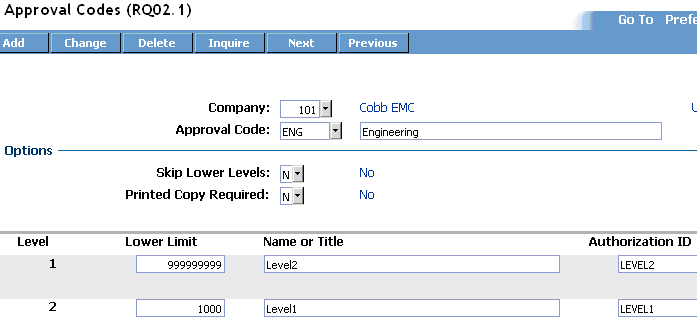
Each Requester is assigned an Approval Code which is built to identify the number of approval levels and the approval dollar base for each approval level.
All requisitions are reviewed by a Level 1 Approver and if the value of the requisition (excluding the Unreleased or Rejected lines) exceeds the Lower Limit (the maximum value the Approver is authorized for) the flow Branches to the next approval level:
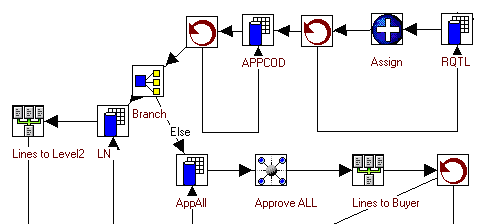
Each approval level has its own flow file and the requisition lines are passed to the next flow file via a Work Object. The last stage all requisitions go through is the Buyer flow (note that the requisition is approved before being passed to the Buyer).
The Buyer has the option to send a Line to Quote or all remaining lines Send to PO:

When the Line to Quote action is selected the flow uses an AGS call to create a PO16 Bid and then adds the requisition line to that bid. The Branch checks the item type and only sends I or N type items to the bid. (We submitted an enhancement request to Lawson to allow X type items to be added to bids. It is being “considered for future”.)
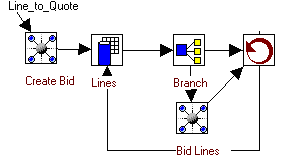
If a bid was already created by a previous line the Create Bid AGS call would return a “Bid already exists” message but since that wouldn’t cause a problem I decided not to add the additional step to check for this first.
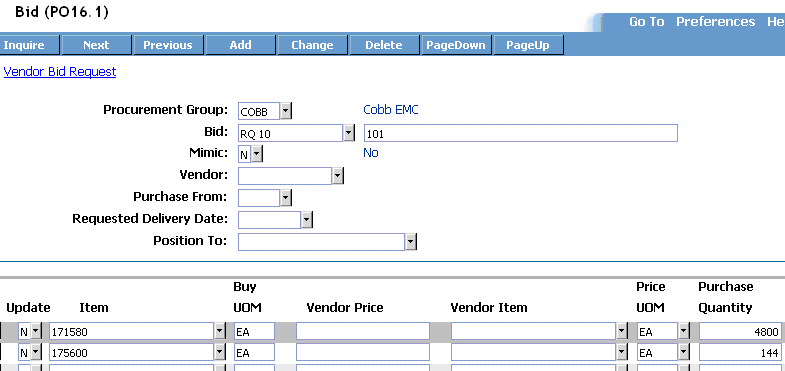
Using Design Studio, we modified PO16 to include a link to open a Crystal Report bid form to send to vendors. The link also passes the parameters to Crystal so the report defaults to the bid currently displayed.
The Buyer uses PO23 to assign the items to the vendor of choice from the returned bids.
When the Lines To PO action is selected, the flow file goes through the following steps:
- A Query is used to find the requisition line vendor for an open Work Unit
- A Branch bypasses the requisition line if no vendor is assigned
- An AGS call creates a PO Header via PO20
- An Email is send to the Buyer with the PO #
- A Query finds all requisition lines assigned to the vendor
- A Query checks to see if that line has already been pushed to Bid
- A Branch bypasses adding the line to a PO if it’s on Bid
- The Work Unit for the requisition line is closed via an AGS call
- The requisition line is added to the PO via an AGS call
- This loop continues until all open Work Units are processed
Requisition lines that do not have a vendor are emailed to the Buyer letting him/her know to process these lines via PO23.
For the sake of brevity some of the process steps (like using the MsgBuilder) were excluded. I also couldn’t list all of the revisions we made to get to the process now in place. Ideas that seemed to make sense in the design stage weren’t practical in production and were quickly revised.
I appreciate Tom Denison and Cobb EMC for allowing me to publish this case study. |
|
|
| |
|
|
|
| |
2. Sliding Doors |
|
|
| |
|
|
|
| |
A few years ago there was a movie by the name of “Sliding Doors” (see http://www.amazon.com/gp/product/6305210411/002-1493439-0644836), of which I remember very little except that the concept was pretty unique. [Read More] |
|
|
| |
|
|
|
| |
3. Worthwhile Reading |
|
|
| |
|
|
|
| |
Standard Reports: Basics for Business Users
- QUOTE OF THE ISSUE –
“Everything should be made as simple as possible,
but not simpler.”
-- Albert Einstein
How to plan, prioritize and design the primary vehicle for delivering business intelligence.
Intelligent Enterprise, February 2006
http://www.intelligententerprise.com/showArticle.jhtml?articleID=177103011
Pay-per-view ERP
Is on-demand transaction software ready for prime time?
CFO Magazine, February 2006
http://www.cfo.com/article.cfm/5435396/c_5461573
Nestlé Pieces Together Its Global Supply Chain
More than five years ago, the world's largest food maker set out to standardize how it operates around the world. GLOBE, or the Global Business Excellence program, is aimed at getting far-flung operations to use a single system to predict demand, purchase supplies, collect payments from customers and market its products. Getting more than 40 managers to buy into the global standardization project was no easy sell.
Baseline Magazine, January 2006
http://www.baselinemag.com/article2/0,1540,1912057,00.asp
Whipping IT data into shape
Enterprises are tackling the ugly problem of reconciling widely distributed data, driven in part by the move to service-oriented architecture.
Infoworld, February 6, 2006
http://www.infoworld.com/article/06/02/02/74665_06FEmdm_1.html?s=feature
|
|
|
| |
|
|
|
| |
4. Lawson Tips & Tricks |
|
|
| |
|
|
|
| |
Share your tips. Send them to mailto:letter-tips@lawsonguru.com.
You can view Tips & Tricks from past issues on the Tips & Tricks page on LawsonGuru.com
Adding custom Lawson library code
If you are making Lawson customizations and have properly designed and organized your code, you will probably find that you want to take advantage of Lawson's common library features (i.e. "pdlib" and "wslib"). That way you can isolate common code to one place and avoid repeating it within a customization. The way to do this is to put it in a common library.
The problem is in understanding how to create the library and put your code into it. The answer, of course, is libdef, Lawson's library definition utility. Normally when you create a new program, you use pgmdef first to create the program, and then write your code. However, with a library, if you try to create the library first, you'll be forever staring at the entry in libdef and nothing will be happening:
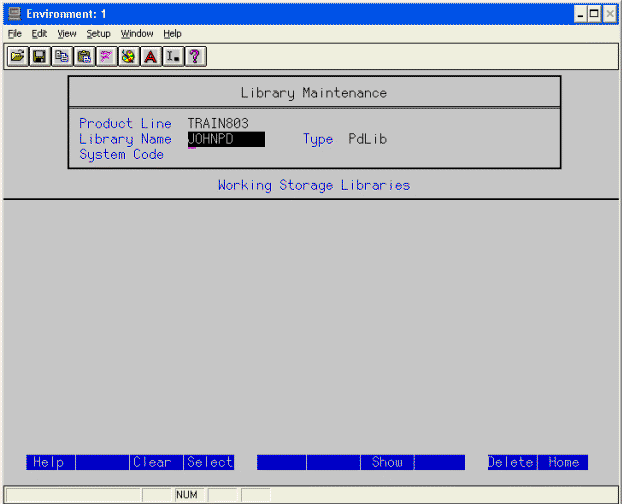
What you need to do is create the program code/file first in the pdlib directory, and then enter the library name into libdef:
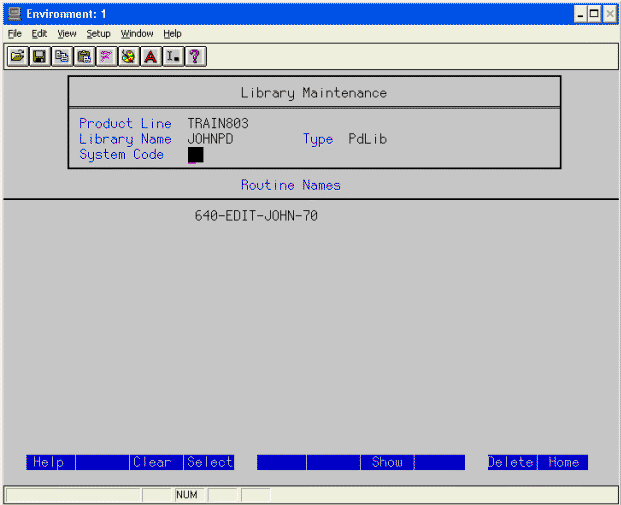
Your library code will be scanned for SECTION names correlating to routines, and if valid, you can then add the library. At this point, your custom programs can then PERFORM the routines stored in your own custom library. Also, remember that beginning with 8.1 Applications, "pdlib" and "wslib" are no longer "global" to a product line, but are now specific to each system code.
|
|
|
| |
|
|
|
| |
© Copyright 2006, Decision Analytics. All rights reserved. |
|
|
|
| Please share The LawsonGuru Letter in whole or in part as long as copyright and attribution are always included. |
| |
|
Decision Analytics is an independent consultancy, focusing on Lawson technical projects, and specializing in reporting, customization/modification, data conversion, and integration/interfaces. Please visit https://www.danalytics.com for more information.
|
|