|
 |
|
|
|
|
 |
July 2006
|
 |
| |
|
|
|
| |
In this issue:
1. Guest Spot: Lawson 9.0 Web App Redeployment via Scripting
2. Worthwhile Reading
3. Lawson Tips & Tricks
The LawsonGuru Letter is a free periodic newsletter providing provocative
commentary on issues important to the Lawson Software community.
The LawsonGuru Letter is published by—and is solely the opinion of—John
Henley of Decision Analytics.
Visit Decision Analytics at
https://www.danalytics.com. For subscription information, see the
bottom of this message.
The LawsonGuru Letter is not affiliated with Lawson Software.
Welcome back to Alexsei Wolff, who joins us for another turn in the Guest
Spot! |
|
|
| |
|
|
|
| |
Before we get started... |
|
|
| |
|
|
|
| |
I Need your Input on RMI
Stability |
|
|
| |
|
|
|
| |
It will be a while before everyone gets upgraded to LSF 9.0.
In the meantime, we'll still be running the 8.0.x
Environment.
So, I'm planning
an article or two on RMI/Tomcat/Portal stability, and I
need your input.
Specifically, here's what I'm looking for:
-
How are global and/or 24x7 organizations dealing with
having to periodically restart RMI?
-
What versions, ESPs, patches, settings, etc. seem to
make it more stable?
-
What software combinations and/or platforms
(Tomcat/Apache, Tomcat/IIS, Websphere, etc. etc.) seem
to perform the most reliably?
-
If you've suffered from RMI instability, have you
contacted Lawson? If so, were you satisfied with their
response?
Send your submissions to
mailto:letter-editor@lawsonguru.com. |
|
|
| |
|
|
|
| |
1. Guest Spot: Lawson 9.0 Web App Redeployment via
Scripting |
|
|
| |
(by Aleksei
Wolff, New Breed Corporation) |
|
|
| |
|
|
|
| |
Summary As more and more of us migrate to
Lawson System Foundation (LSF) 9.0 (including WebSphere)
you’ll be called upon to “Re-Deploy your Web
Applications” each time you install a LSF patch or
Service Pack.
The Web Applications include Lawson Security, BPM
(a.k.a. Process Flow), and IOS. The above applications
are delivered by Lawson as Enterprise Archive files
(.ear) and need to be re-deployed to your WebSphere
Application Server (WAS) to take advantage of new
functionality and bug fixes.
The Lawson recommended process is to login to the WAS
admin console and click thru several screens as you:
-
Stop the Enterprise Applications (Lawson
Security, BPM, and IOS)
-
Uninstall the Enterprise Applications
-
Synchronize the Nodes
-
Install each ear File
-
Save to the Master Configuration
-
Synchronize the Nodes again
-
Start the applications
-
Generate the WebServer plugin-cfg.xml file
-
Propagate the plugin-cfg.xml file (If your web
server is remote from WAS)
These 9 steps are time consuming and error prone but
luckily there is an easier way to deal with this
situation. IBM provides two options for administering
WAS:1. Administrative Console – A
web enabled application that allows you to do most
administrative, installation, and configuration tasks.
Using this option is recommended if you are not yet
familiar with WebSphere and need some hand holding along
the way.
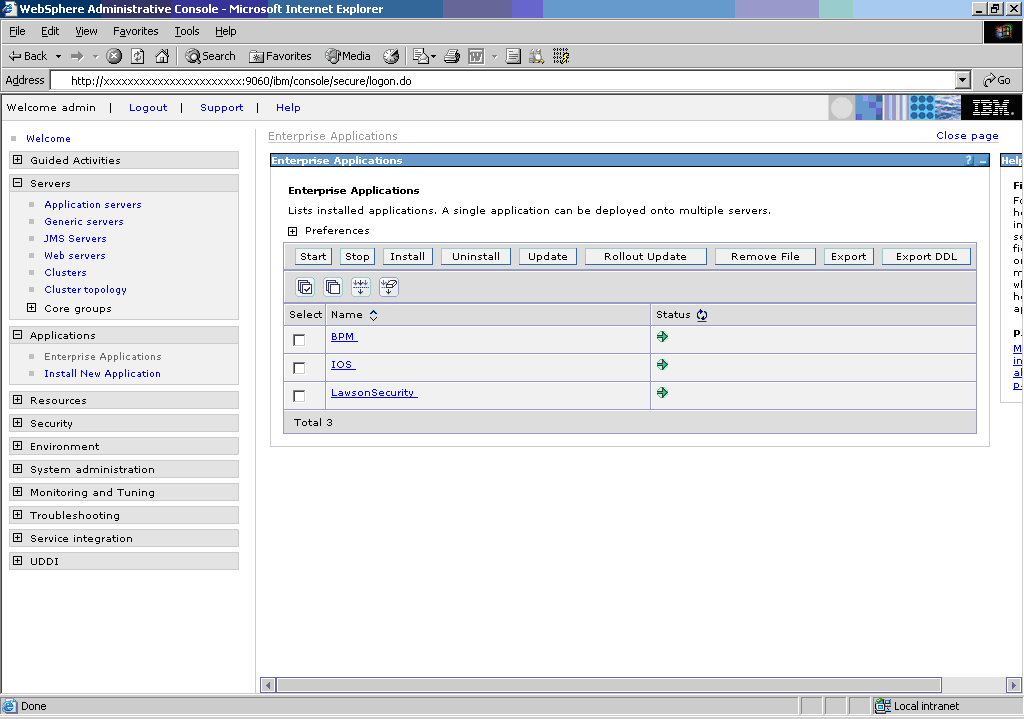
Figure 1. Snapshot of the administrative console.
2. wsadmin –A command line utility that allows
interactive and scripting capabilities to manage your
WebSphere Application Server. This tool uses the Bean
Scripting Framework (BSF), which supports a couple of
scripting languages. The two supported scripting
languages as of today are Jacl and Jython.
Using this tool along with either of the scripting
languages allows you to automate the tasks thereby
increasing repeatability and reducing errors.
So what is Jacl and Jython?
Both Jacl and Jython are JVM embedded versions of the
popular scripting languages Tcl and Python respectively.
If you know either of these languages already you are in
luck. If you don’t then the toughest thing about them is
choosing which one to standardize upon. After looking at
each one in detail I decided to use Jython since its
object oriented syntax was more familiar to me. The
downside to Jython is that it’s only been in use with
WebSphere since version 6.0 and therefore there are not
too many examples out on the net to use as a starting
point. To learn more about jython visit:
http://www.jython.org.
Both of these languages interact with the wsadmin
tool via JMX and 4 standard Mbeans to allow full access
and control of the different administrative components
of WAS.
Figure 2. wsadmin Mbeans
-
AdminApp – install, modify, and administer applications.
-
AdminConfig – create, change WebSphere Application Server static configuration.
-
AdminControl – work with live running objects, perform traces and data type conversion.
-
AdminTask – access administrative commands to provide alternate ways to access configuration commands.
For additional information on all the valid methods and options available for these Mbeans refer to the
following link:
http://www-306.ibm.com/software/webservers/appserv/was/library/
and search for “Using the Administrative Clients”.
Sample Script
The following sample script uses Jython to demonstrate
the re-deployment process of the Lawson Web Application
“BPM”. Feel free to use the sample script below as a
starting point to develop your own dynamic Jython
scripts to use in your patch application process. There
are a myriad of ways to improve this script to be more
dynamic but I leave that as an exercise for the reader.
Enjoy!
| |
print "Starting Script"
appName='BPM'
cellname='erpappCell01'
nodename='erpappNode01'
servername='server1'
print "Obtaining the Application Manager Mbean"
appManager=AdminControl.queryNames('cell='+cellname+',node='+nodename+',type=ApplicationManager,process='+servername+',*')
AdminControl.invoke(appManager, 'stopApplication',
appName)
AdminApp.uninstall(appName)
print "Applications Stopped and Uninstalled"
print "Saving to Master Configuration"
AdminConfig.save()
#Node Synchronization
print "Synchronizing the nodes"
Sync1=AdminControl.completeObjectName('type=NodeSync,node='+nodename+',*')
AdminControl.invoke(Sync1, 'sync')
print "Installing Application BPM"
OptStr ='[ -nopreCompileJSPs -distributeApp -nouseMetaDataFromBinary
'
OptStr += '-nodeployejb -appname BPM -createMBeansForResources
'
OptStr += '-noreloadEnabled -nodeployws -validateinstall
warn -noprocessEmbeddedConfig '
OptStr += '-MapModulesToServers [[bpm.war
bpm.war,WEB-INF/web.xml WebSphere:cell'
OptStr += '='+cellname+',node='+nodename+',server='+servername+']]
'
OptStr += '-MapWebModToVH [[bpm.war bpm.war,WEB-INF/web.xml
default_host]]]'
AdminApp.install('/lawson/test/gen/assembly/components/ear/bpm.ear',
OptStr)
print "Saving to Master Configuration and
Synchronizing the Nodes"
AdminConfig.save()
Sync1=AdminControl.completeObjectName('type=NodeSync,node='+nodename+',*')
AdminControl.invoke(Sync1, 'sync')
print "Start the application BPM"
AdminControl.invoke(appManager, 'startApplication',
appName)
print "\nScript Completed" |
|
|
|
|
| |
|
|
|
| |
2. Worthwhile Reading |
|
|
| |
|
|
|
| |
Teamwork! Secrets of Greatness
- QUOTE OF THE ISSUE –
“The world is full of willing people,
some willing to work, the
rest willing to let them.”
-- Robert Frost
Teams are just about everywhere you look. What makes them tick?
Fortune, June 1, 2006
http://money.cnn.com/magazines/fortune/great_teams/
Oracle SQL Developer Soars
Bring the power of a GUI-based workbench to SQL and PL/SQL.
Oracle Magazine, May/June 2006
http://www.oracle.com/technology/oramag/oracle/06-may/o36sql.html
The SOA lifecycle
Service-oriented architecture is an organic idea, not a technology.
Our experts explain how to plan, build, and manage
an SOA without getting lost in the weeds.
Infoworld, May 8, 2006
http://www.infoworld.com/reports/19SRsoalife.html
|
|
|
| |
|
|
|
| |
|
|
|
| |
|
|
|
| |
| |
 |
I'd like to introduce
you to The MEDITECH Community
Bulletin, published by Donna
Carroll of Systems Personnel, a
professional search firm specializing in
the nationwide search and placement of
Healthcare Management and Information
Technology professionals.
The MEDITECH Community Bulletin
is a periodic newsletter covering a
broad range of topics that are relevant
to the MEDITECH community. |
| |
| Read the
latest issue:
|
http://www.carrollsearch.com/newsletter/mcbjune2006web.htm |
|
Subscribe: |
http://www.carrollsearch.com/meditech.asp |
| |
|
|
|
|
|
| |
|
|
|
| |
3. Lawson Tips & Tricks
|
|
|
| |
|
|
|
| |
Share your Tips & Tricks. Send them to
mailto:letter-tips@lawsonguru.com.
You can view Tips & Tricks from past issues on the
Tips & Tricks page on LawsonGuru.com.
This month's submission comes from David Williams of Paradigm Business
Solutions.
Date to String in JavaScript
[This tip only works with locales that enter dates in MM/DD/CCYY
formats. Next month I'll share some code for handling the others --
Ed.]
Here’s the JavaScript expression I use in ProcessFlow to convert a date
value in a string variable to an AGS format. The value of my variable
RQDATE (the requested delivery date value from the requisition) =
02/29/2006. I want to use this value to push the requisition line to a
PO via the PO Worksheet (PO23) and need this date to be represented in AGS (yyyymmdd)
format.
JavaScript doesn’t have a Right, Left or Mid expression like other languages
so when using an Assign node; I am taking the date from my RQDATE variable
and reformatting it to my RQDELDT variable:
RQDELDT = RQDATE.charAt(6) + RQDATE.charAt(7) +
RQDATE.charAt(8) + RQDATE.charAt(9) + RQDATE.charAt(0) + RQDATE.charAt(1) +
RQDATE.charAt(3) + RQDATE.charAt(4)
The first character position in JavaScript is 0 (unlike other languages
which identify the first character position as 1) so the year is in
positions 6 through 9, the month is in positions 0 + 1 and the day is in
positions 3 + 4 (02/29/2006 position values are 0-9 instead of 1-10).
The JavaScript expression is selecting the character at – charAt – the
position specified within the parenthesis and assigning it to the RQDELST
variable. The plus (+) isn’t adding the value from each position, it’s
appending those values so that the RQDELDT variable = 20060229.
I can now use the RQDELDT variable in my AGS call to add the requisition
line to the PO and assign the correct requested delivery date. |
|
|
| |
|
|
|
| |
© Copyright 2006, Decision Analytics. All rights reserved.
|
|
|
|
|
Decision Analytics is an independent consultancy, focusing on Lawson
technical projects, and specializing in reporting, customization/modification, data
conversion, and integration/interfaces. Please visit https://www.danalytics.com for more
information.
|