1. Lawson Design Studio, Part 8: Portal Page Designer
Getting back to our Lawson Design Studio article series, we’ll explore some features of the Portal Page Designer. Like the UI Designer, the Portal Page Designer includes two sets of tools:
- The Portal Page Designer itself, which let’s you create composite pages from Lawson (and non-Lawson) application forms.
- To create even more complex customizations, you combine JavaScript (including Design Studio-specific objects) with the Portal Page Designer.
Why use the Portal Page Designer?
The primary use for the Portal Page Designer is for creating customized Lawson Portal pages. The goal, of course, when creating a page using the Portal Page Designer, is to simply a business process.
A Portal Page is composed of one or more “panes”, which are essentially pieces of web-delivered content. Portal pages can be composites of other Lawson forms or queries, or even non-Lawson web content. Further, you can incorporate forms customized with the Form Designer as content on a Portal Page customized using the Portal Page Designer. We’ll tackle this type of sample in a future article.
The content panes on a Portal Page can be “connected” so that a change or navigation performed in one pane updates the content of another pane. For example, a list of customers could be displayed in one pane, and when the user selects one of the customers, the open invoices list displayed in the other pane would be updated.
Our Portal Page Example
In this article, we will create a customized page using the Page Designer. We will then see the new page in action. As with previous articles, a few notes:
- Demonstrating a product and its features via a static article is impossible. I do gloss over some steps in this article. My intention is to show you the highlights of modifying a form and whet your appetite and imagination.
- I’m not attempting to replace Lawson’s documentation; as such, these article is not a re-hash of ‘this is a menu bar’, this is, blah blah, blah. If you want to get more detail, read the documentation and consider some training.
- Design Studio can be very flaky; remember that it is a browser application. It can’t do everything and it does hang—a lot, but not as much as it used to. If you’re just starting with it, you will achieve a certain level of frustration—I will guarantee it. Even if you’re an experienced user, expect to lose your work on occasion. There are some ways to mitigate that (perhaps we’ll explore this topic in a future article). But, as I like to tell people: “it is what it is”.
Our Design Specification
Remember--our focus, in this article series, is to use Design Studio make a business process simpler and easier-to-perform. The primary goal for this article is to focus on using Design Studio’s Page Designer to render a simple list of vendors and show their open invoices. In a future article, we’ll look at another example which takes this concept even further by combining a number of Lawson tables and forms to create an extremely streamlined process.
Accessing Design Studio
Lawson Design Studio—like Lawson Portal—is a browser-based application. It is an add-on product (i.e. you have to be licensed for it, and install it separately from Lawson Portal). So, if you have Design Studio, enter the URL to access it:
Env 8: http://<lawson web server>/lawson/portal/studio
LSF9: http://<lawson web server>/lawson/studio
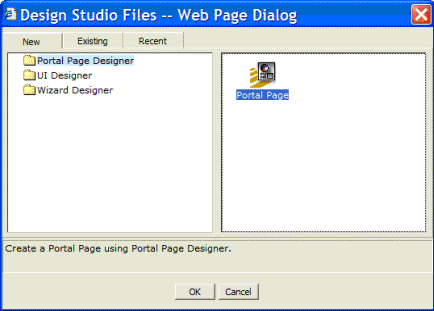
Once you log in, select the ‘New’ tab, choose the Portal Page Designer, and double-click on the Portal Page icon:
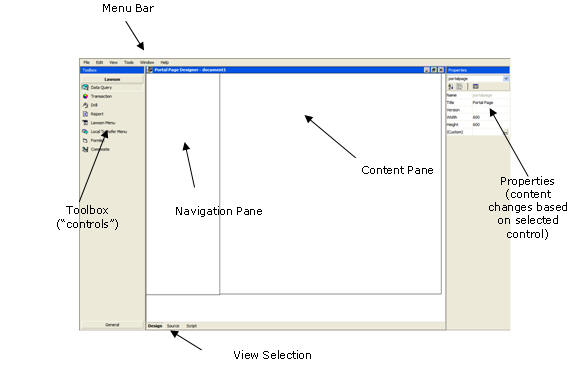
Components of a Portal Page in the Page Designer
Once the new page is created, you can see it in the Page Designer:
Remember that Design Studio has its own menu bar, which displays underneath the browser’s menu bar: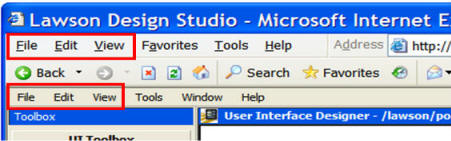
On countless occasions, I’ve dropped-down the wrong ‘File’ menu and tried to ‘Save’ the Lawson Design Studio .xml file using the IE menu bar!
Working with Page objects
Unlike the UI Form Designer which has a QuickPaint feature, the Portal Page Designer presents a blank slate. What you do with it is up to you, and the tools you have available. In particular, you have two sets of objects in the toolbox:
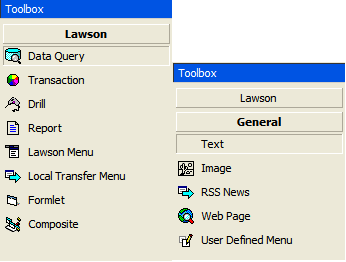
In this article we’re going to focus on the Data Query object from the Lawson group, as well as the text object from the General group. We’ll examine some of the others in a future article.
Let’s Get Started
The first thing we’ll do is put a header on the page, using the Text object; double-click the Text object in the toolbox, and the new object will appear on the page:
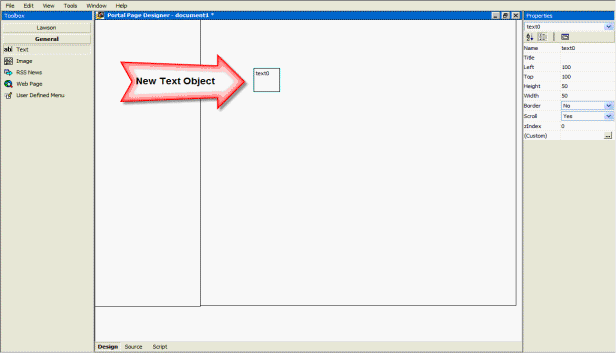
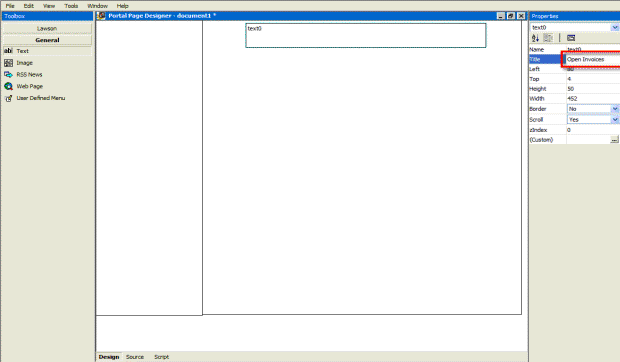
As you can see, I put the big arrow next to it because it’s not really sized very nicely. Select it and re-size it. Then set the Scroll property to ‘No’, click on the Title property (it’s really the heading for the text box), and enter the page title:
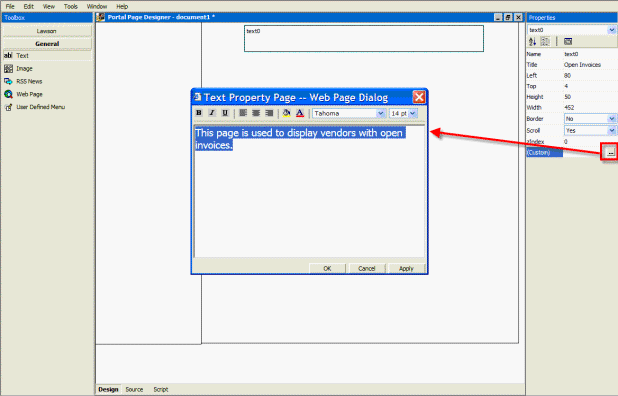
Then click on the ‘Custom’ (ellipsis) property to enter the actual text and attributes:
Previewing Your Page
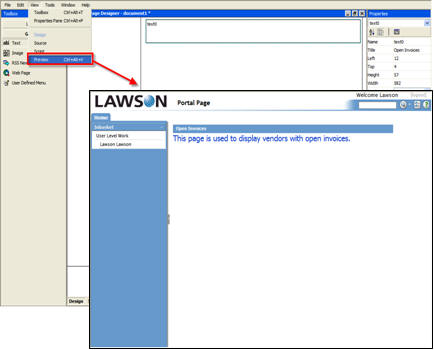
Let’s see how it looks; Click the View | Preview option to view the Portal Page we’ve created thus far:
Adding Some Data
Click on the Data Query icon in the Lawson Group of the Toolbox; this will add a Data Query (DME) object to the page. Resize it, add the title, and then click the Custom (ellipsis) property, which will display the Query Builder:
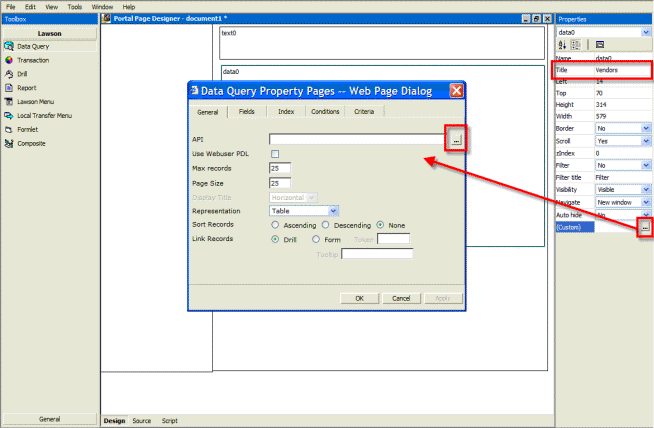
Click the API Ellipsis icon to open the API Builder; if you’ve used Lawson Query Builder with either the Design Studio UI Form Designer, Enterprise Reporting/LBI/Crystal, or the Excel Add-Ins, it’s quite similar.
Once you’ve selected the product line, system code and (base) table for the query, you then select the fields to be used for the query, and click the ‘Build Query’ button:
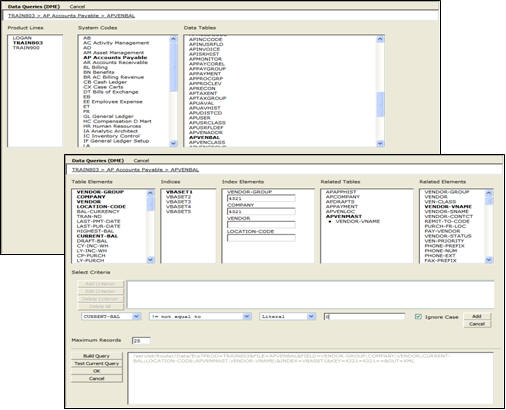
This will insert the query back into the Query Designer Dialog.
Adding Some Features to the Query
We’ll do a few things in the query:
- Select the ‘Use Webuser PDL’ option, which will use the Product Line associated with the user when running the query, overriding what’s in the query.
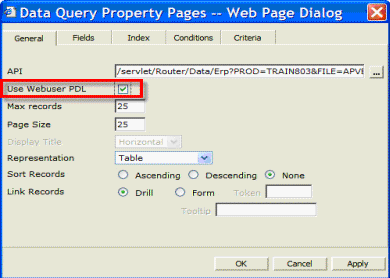
- Change the headings, and add sorting:
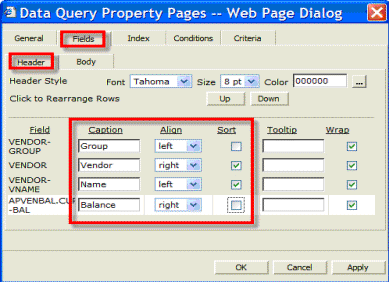
- “Hard-code” the Vendor Group and Company since we only want to see vendors in the ‘4321’ Group and Company:
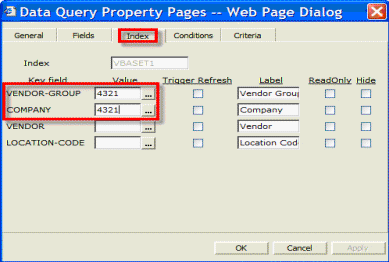
- Add Drill-Around links on the Vendor Group and Vendor columns. Yes, it’s that easy!
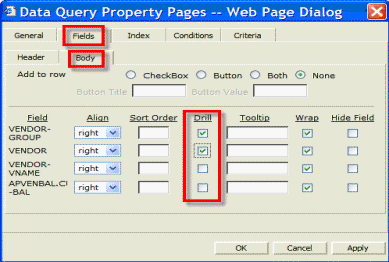
Testing and Deployment of Custom Forms
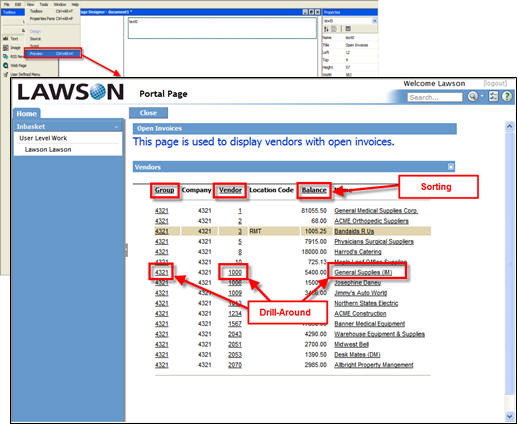
If you preview your page again (remember you’re working with “live” data!), you’ll be able to see the new page. Note that by clicking on the heading for Group, Vendor, and Balance, you can sort by the column values. Also, by clicking on the fields in the rows you have built-in DrillAround:
Saving your Creation
The Portal Page and each of its elements are saved into a separate .xml file:
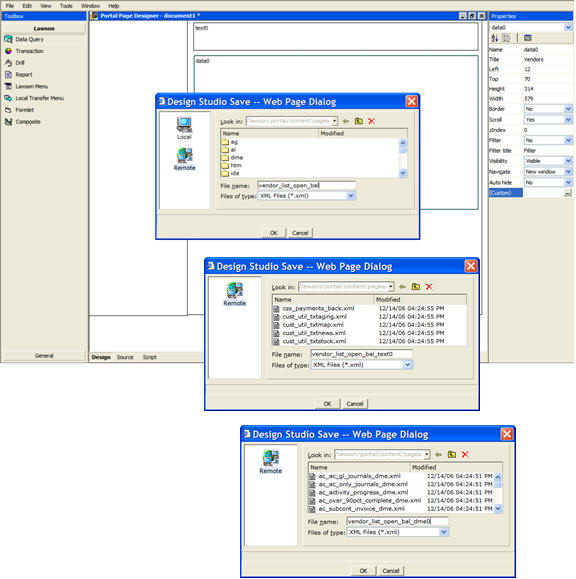
In an upcoming article we'll look at how a Portal Page, when combined with a form customized with the Design Studio Form Designer, creates a streamlined solution for a business process.
2. What's Happening? The LawsonGuru Blog.
3. Worthwhile Reading
4. Lawson Tips & Tricks
Chances are you've copied data between product lines before. Or, maybe you'll need to do it as part of a development, implementation or upgrade project. There are a number of ways to accomplish this, from using native database utilities, to using some of Lawson's utilities like expsysdb/impexp and dbcopy.
Here's the way I do it, using a method I think is by far the easiest, and it's also very fast.
View the rest of this tip on LawsonGuru.com (site registration required).
© Copyright 2007, Decision Analytics. All rights reserved.